Your category order
Drag categories into any order, sort them A to Z, or move one straight to the top from the right-click menu. Each category shows how many items it holds.
IPTV player for Windows
NeonVix brings live channels, films and series from your M3U playlists or server logins together in one app. Search everything at once, browse by smart genre and arrange your categories your way. Go Premium to merge playlists, watch up to four channels at once and unlock every theme.
Free to download Premium from US$1.99 a month No ads, no tracking
NeonVix is a player only. It doesn’t include any channels, playlists or subscriptions.
01 · Merge Mode Premium
Merge Mode is for anyone with more than one playlist. Pick up to six of your saved playlists from the playlist menu and NeonVix combines them into a single library.
Merge Mode and saving more than one playlist are part of NeonVix Premium.
02 · Global search
Type a channel name to search every category at once. With Premium, you can also search the TV guide to see what’s on.
03 · Smart Genres
Provider category names are often a mess. NeonVix reads channel names, categories and genre tags, then sorts everything into genres you can filter by in one click.
SportsNewsKidsEntertainmentComedyMusicScienceHistoryNatureCrimeReligionFood
ActionAdventureAnimationComedyCrimeDocumentaryDramaFamilyFantasyHistoryHorrorMusicMysteryRomanceSci-FiThrillerWarWestern
Action & AdventureAnimationComedyCrimeDocumentaryDramaFamilyKidsMysteryRealitySci-Fi & FantasySoapTalkWar & PoliticsWestern
Automatic genres, hiding genres you don’t use and turning automatic genres off are free, and so is moving a single channel or title out of the wrong genre. With Premium, you can tag a whole category at once, make your own genres and add rules such as “names containing this word go here”.
Genres are guessed from the names and categories your provider supplies, so some may be wrong or missing. Kids genres are only suggested from your provider’s own labels or well-known children’s channel names.
04 · Colour themes
Pick a theme and the whole interface changes colour, including buttons, progress bars and highlights. You can also choose a custom colour with the picker. NeonVix checks that it stays readable on the dark background.
Indigo and Green are free. The other eleven themes and the custom colour come with Premium.
05 · Live TV, movies & series
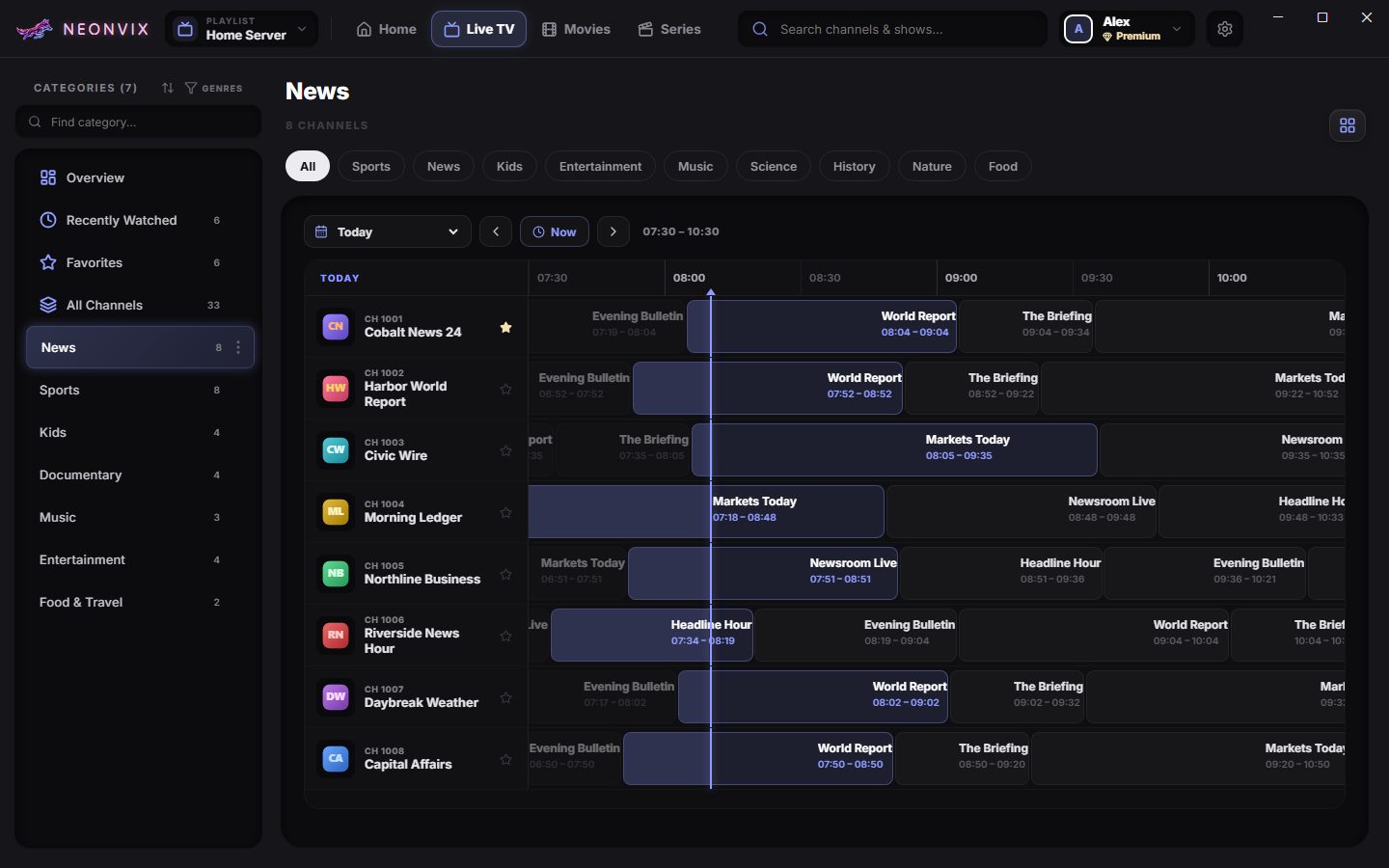
Start on Home or browse each section from its overview. Live TV is a full TV guide, movies show posters and details, and series are split into seasons and episodes.
Highlights
Arrange your categories your way, back up your whole setup and manage your account in one place.
Drag categories into any order, sort them A to Z, or move one straight to the top from the right-click menu. Each category shows how many items it holds.
Save your playlists, favourites, history, category layouts, genres, parental controls and settings into one password-protected file. Restore it on another PC, and undo if you change your mind.
See your plan, change your name or email, sign out of every device at once, or delete your account. Your library stays on your PC.
And everything else
Skip back or forward by 5, 10, 15 or 30 seconds, switch audio tracks, set a default volume, or start muted. A sleep timer stops playback after a set time or when the show ends. With Premium, pop the video out into picture-in-picture while you browse.
Use the subtitles in the stream or load a file (SRT, VTT, ASS, SSA or TXT), then change the timing, size, position, colour and font as you watch. Live channels show closed captions when the broadcast includes them. With Premium, search OpenSubtitles.com from the player and download with your own OpenSubtitles account.
Watch up to four live channels side by side, and pick which one you hear. Some providers limit how many streams you can open at once.
Play programmes that already aired, straight from the guide, when your provider keeps an archive for that channel.
Tap the bell on an upcoming programme and NeonVix reminds you shortly before it starts.
Fix stretched or letterboxed channels by adjusting zoom, width and height. If the sound is out of sync, you can delay the audio.
If a stream won’t start, NeonVix tries again by itself. If it still fails, you can retry manually or open it in VLC.
Lock any category behind a 4-digit PIN. Locked content also stays out of search, genres, favourites and Continue Watching. Too many wrong guesses lock the PIN pad for a while.
Right-click a category to pin it, move it to the top, hide it or lock it, or drag categories into your own order. Hidden categories stay in a folder so you can bring them back.
Use the guide from your provider or load your own XMLTV file. Choose how often it refreshes and whether times show in 12 or 24-hour format.
Sign in with a code sent to your email, or continue as a guest. Add a display name and avatar. Free keeps one playlist per profile; Premium keeps up to six.
Huge playlists stay responsive. Only the items on screen are drawn, and guide loading and genre sorting run in the background so the app doesn’t freeze.
Getting started
Get NeonVix free from the Microsoft Store, then sign in with an email code or continue as a guest.
Enter the server login or M3U link from a provider you’re allowed to use. NeonVix doesn’t sell or supply these.
Pin and reorder your favourite categories, then go Premium if you want to merge playlists or pick any colour.
Pricing
Everything you need to watch is free. Premium adds power features and supports an independent player.
$0forever
Live TV, films, series and the full TV guide.
$1.99USD / month
Or US$12.99 a year, or Lifetime for a one-time US$24.99 launch price until January 1, 2027 (then US$34.99). Everything in Free, plus:
Buy inside the app. Billed by Microsoft. Cancel subscriptions anytime.
Prices are in US dollars. The Microsoft Store shows the price for your country, including any tax. Compare every feature →
Privacy
Your playlists, TV guide, favourites, watch history, tags and parental settings are saved on your computer. They aren’t uploaded to us.
Read the Privacy Policy →Please read
NeonVix doesn’t provide, sell, host or link to any channels, films, series, playlists, subscriptions, logins or TV guides. You need your own source, and you’re responsible for making sure you’re legally allowed to use it where you live.
Mentioning Xtream, M3U, XMLTV, VLC or OpenSubtitles.com only describes what NeonVix works with. It doesn’t mean we’re affiliated with or endorsed by those projects or their owners.
Terms, Privacy, Acceptable Use & Copyright →FAQ
No. NeonVix is only a media player, like VLC or any other video player. You add a playlist from a provider you’re allowed to use. We don’t sell, recommend or link to providers.
Xtream-compatible server logins (server, username and password) and M3U playlist links. For the TV guide, it can use the guide from your provider or an XMLTV file you load yourself (.xml or .gz).
It doesn’t hide anything. If two playlists have the same channel, you’ll see both, tagged [1] and [2] so you can tell which playlist each one is from. Categories with the same name are combined into one.
No. You can sign in with a one-time code sent to your email, or continue as a guest. Premium needs an account so it can follow you to your other PCs. Either way, your library is saved on your PC.
Yes. You can switch to VLC in Settings, and if a stream won’t play in the built-in player, you can open it in VLC from there. Some image-based subtitle formats (PGS/VobSub) only work in VLC.
Only from the Microsoft Store. It runs on Windows 10 (version 1809 or later) and Windows 11, 64-bit. The Store installs updates for you.
Not at the moment. NeonVix is a 64-bit Windows desktop app.
NeonVix is free to download and use with one playlist. NeonVix Premium is US$1.99 a month or US$12.99 a year, with a 7-day free trial the first time you subscribe with a Microsoft account, or Lifetime for a one-time US$24.99 launch price until January 1, 2027 (US$34.99 after that). Premium works on up to 5 devices. The Microsoft Store shows the price for your country. See what Premium includes →
Cancel anytime in your Microsoft account. Premium stays active until the end of the period you paid for. After that, nothing you set up is deleted: your theme and genres keep working, and your playlists stay saved. Free uses one playlist at a time, and the others unlock again if you renew.

Download
Free to download. The Microsoft Store installs it in a click and keeps it up to date.
NeonVix includes FFmpeg, which is licensed under the LGPL. The complete FFmpeg source code and checksums for each NeonVix version are published on GitHub. Other open-source licences are listed in the app’s Settings under Open Source Notices.